Auto video editor that edits by itself.
Record yourself talking to camera and get your video back, already edited: no dead air or "uh"s, with captions, framing that follows your face and graphics. Got a long video? It becomes clips ready to post. No timeline, running on your own PC.
Two ways to edit by itself.
Free Content's auto video editor has two modes — pick by the video you have in hand.
Auto Editor
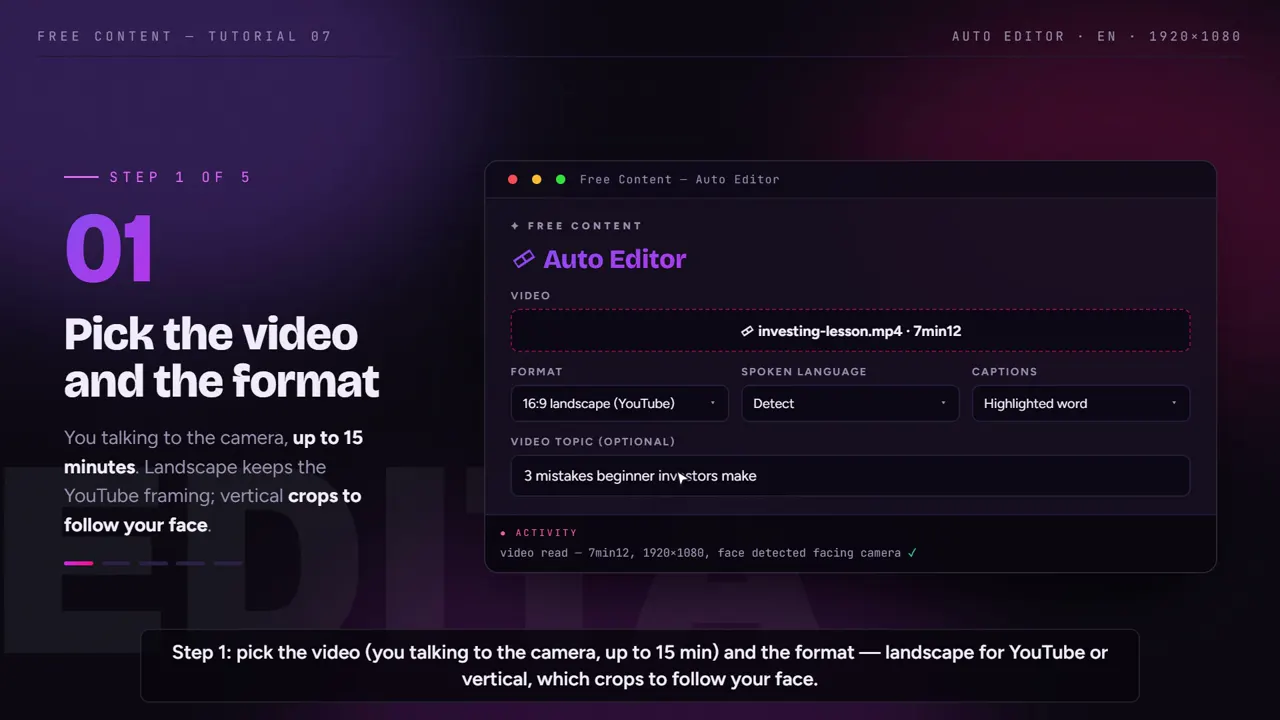
- For the video where you talk to camera, up to 15 minutes
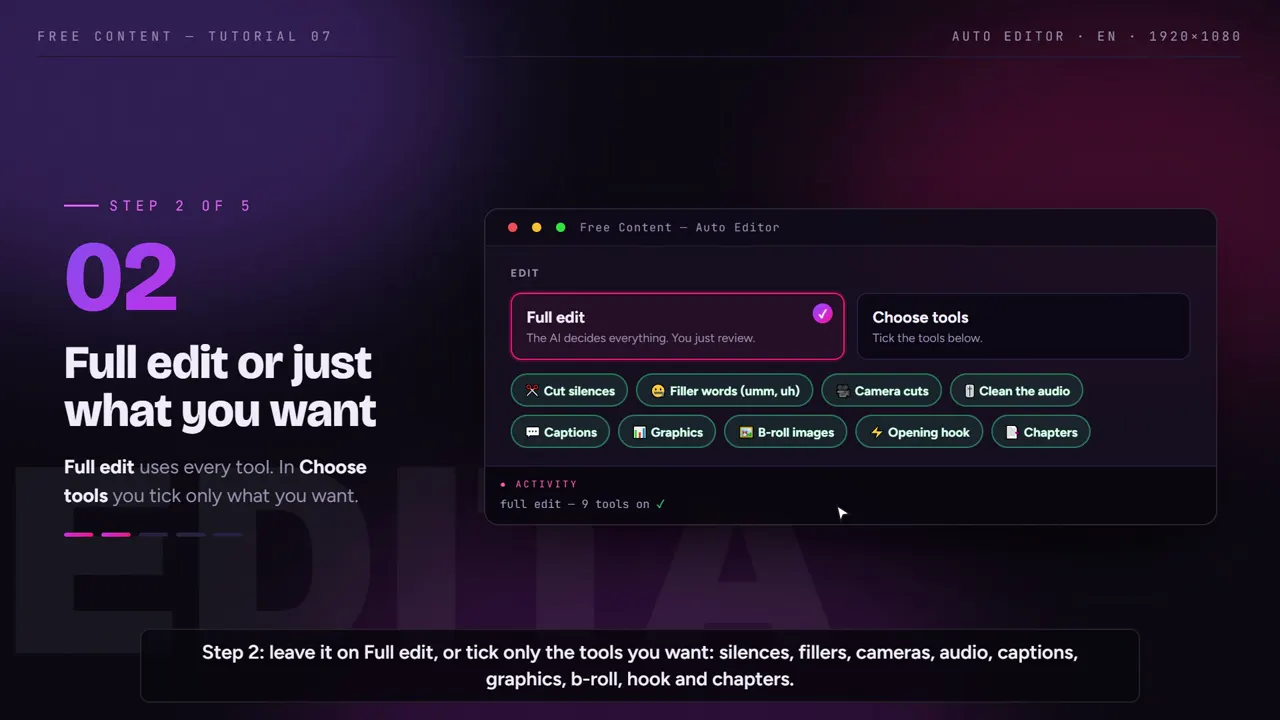
- Removes silences and hesitations, frames, captions and adds graphics
- Out comes your whole video, edited — lesson, tutorial, review, vlog
Clip Maker
- For a podcast, livestream, sermon, class or gameplay (video) — from your PC or a YouTube link
- Picks the strongest stretches and cuts them into several short clips
- Each clip comes out captioned, reframed and with a title and hashtags
Three steps. Nothing dragged.
What takes an afternoon in a traditional editor is a queue here.
Point at the video
Your talking-to-camera video (MP4, up to 15 min) to come out edited — or a long video, from your PC or a YouTube link, to turn into clips.
The AI transcribes and edits
It reads the whole audio. On your video, it removes silences and hesitations and builds framing, captions and graphics; on a long video, it pulls the stretches that stand on their own.
Review and publish
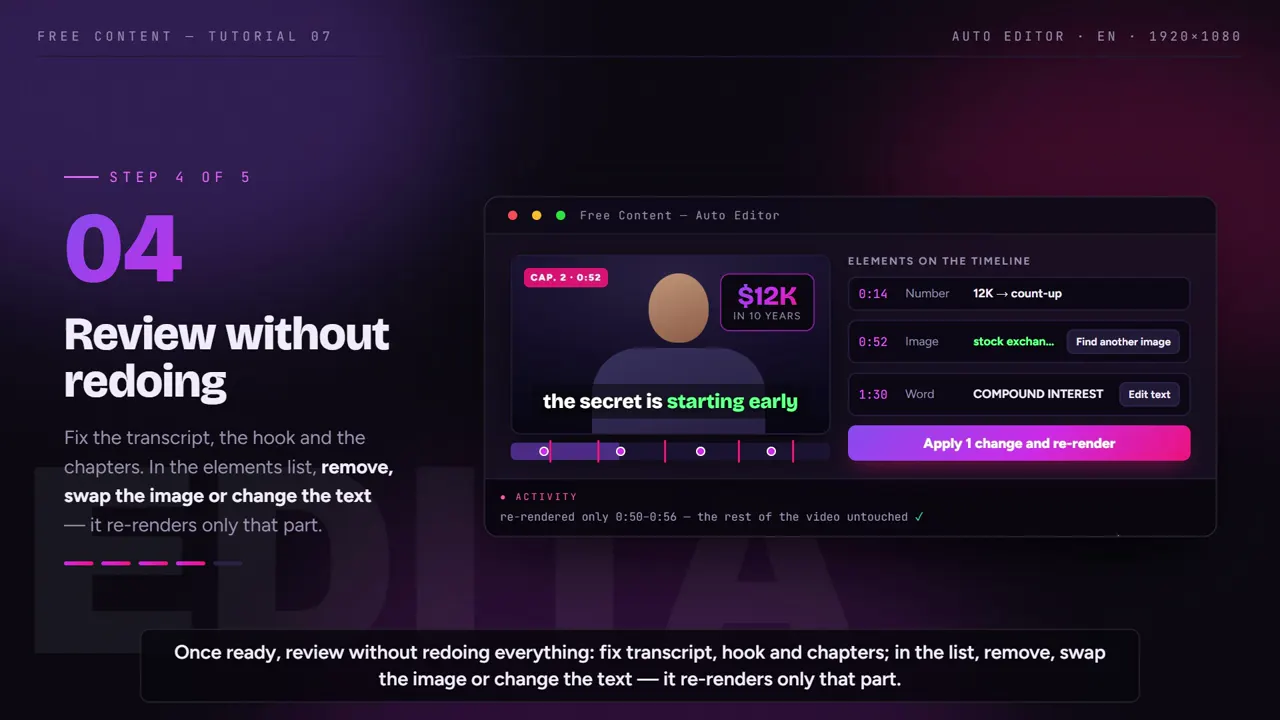
Swap the element you did not like and only that part is redone. Then publish to TikTok, Facebook, Instagram, YouTube, LinkedIn, X, Threads, Bluesky, Pinterest and Bilibili, or schedule it.
Your video, edited by itself: silence removal, captions and framing.
You record yourself talking to camera — up to 15 minutes — and the Auto Editor does the whole edit. No cutting pause after pause on a timeline.
Silence removal, "uh"s included
- Removes the pauses between sentences
- Removes hesitation sounds: "uh", "ah", "hm"
- Every word stays — it does not cut "like" or repeated sentences
Framing and audio treated
- Switches the framing following your face, instead of one static shot the whole way
- Treats the audio of your voice
- Comes out vertical, square or widescreen, in Full HD
Captions, graphics and b-roll
- Captions built from the transcript, in the style you pick
- Graphic elements synced with your speech
- B-roll images where they make sense
Opening hook and chapters
- A hook at the opening to hold whoever just arrived
- Chapters that organize the video
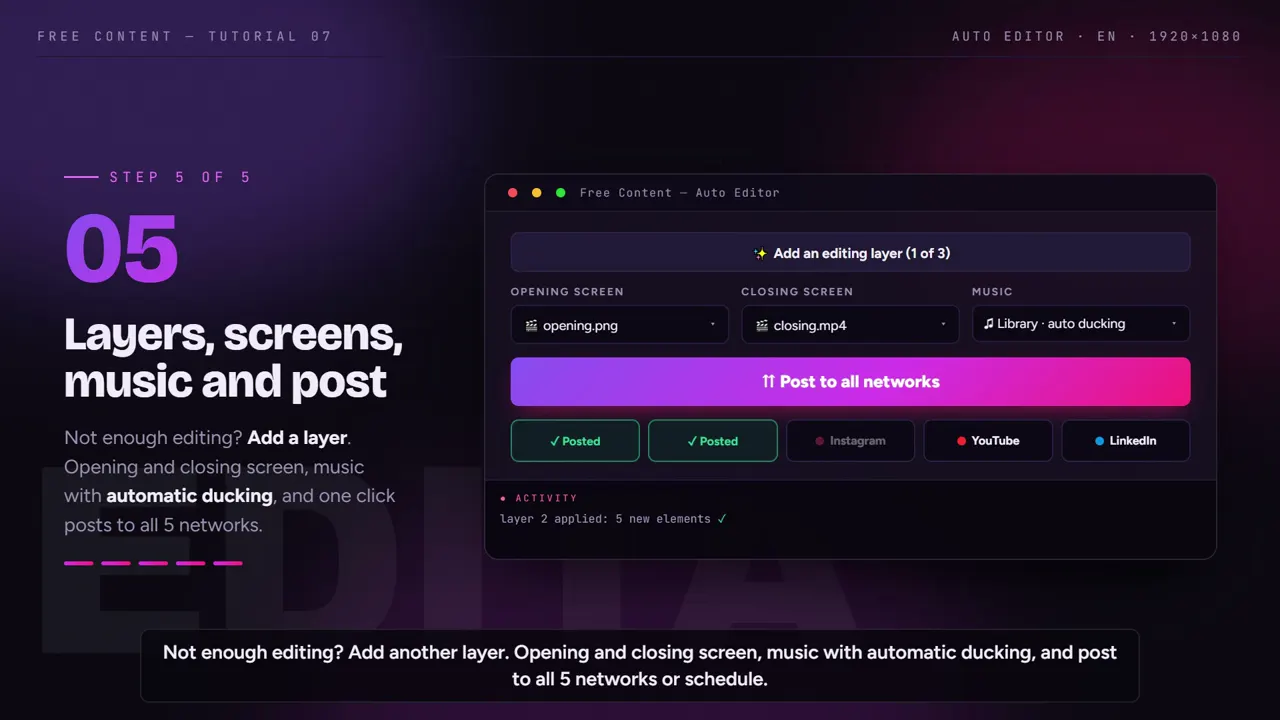
- Opening screen and music, as in the tutorial below
Swap one element, redo only that
- Review every element of the edit before publishing
- Don't like a graphic or an image? Swap it
- Only that part is redone — the rest of the video stays as it was
From edited video to post
- Publishes to TikTok, Facebook, Instagram, YouTube, LinkedIn, X, Threads, Bluesky, Pinterest and Bilibili
- Or schedule it for the day and time you want
- Never a watermark — not even on the 7-day trial
Only need the pauses gone? The remove silence from video page explains in detail how the cut is made, what goes and what stays. Videos longer than 15 minutes — podcasts, livestreams, sermons — are a job for the Clip Maker, right below.
Automatic editing, on video.
Both modes on this page, recorded inside the app — under 2 minutes each.
What the Auto Editor looks like inside the app.
Screens from the tutorial recorded in the app.
Long video → clips: what the Clip Maker does without being asked.
The second mode, for when you have a long video. Every item below is a step you would do by hand, on every single clip, in a normal editor.
Cuts driven by the transcript
- Transcribes the whole audio before deciding anything
- Picks the strongest moments instead of slicing the video into equal chunks
- Each cut starts and ends on a whole sentence, not mid-word
- Pauses and hesitations are removed inside the clip itself
A camera that follows faces
- Vertical, square or widescreen — the same cut in all three
- In vertical, the camera tracks whoever is speaking
- A conversation switching sides leaves nobody out of frame
Synced karaoke captions
- Word-by-word captions, in the rhythm of the speech
- Built from the transcript — nothing typed or synced by hand
- One word wrong? Fix it and it redoes only that clip
A virality score on every cut
- Every clip gets a score, a title and hashtags
- Use it to set the publishing order without rewatching everything
- Whatever came out weak, you drop before posting
Your identity on the clip
- Logo, progress bar and a hook across the top
- AI-generated music over the cut
- The app never stamps a watermark — not even on the 7-day trial
From cut to published post
- Publishes to TikTok, Facebook, Instagram, YouTube, LinkedIn, X, Threads, Bluesky, Pinterest and Bilibili
- Or schedule the whole batch — one clip a day, say
- Scheduled items sit in a list you can track and cancel
An automatic editor that runs on your PC.
The practical difference between editing on your machine and editing on someone else's server.
| Online editor | Free Content | |
|---|---|---|
| Uploading the raw file | required, and long video drags | none — the file is already there |
| Processing queue | depends on plan and time of day | no queue at all |
| Export limit | per month, per minute or per video | no limit |
| Watermark | common on the free tier | never, not even on trial |
| Where your video sits | on a third-party server | only on your computer |
| Render time | depends on the server | depends on your hardware |
The one place the online editor wins is not spending your processor. In exchange you accept a queue, a limit, an upload and your raw footage in someone else's hands. If your material is long — a two-hour podcast, a full livestream, gameplay — the upload alone usually costs more time than the edit.
Frequently asked questions.
About automatic editing. If your question is about the app in general, the home FAQ covers the rest.
What is the difference between an auto video editor and a traditional editor?
Does it take video from my computer or only YouTube links?
Does it reframe widescreen video to vertical?
Can I fix a caption that came out wrong?
Do the clips come with a title and hashtags?
Can I post or schedule the clips straight from the app?
What does it do that an online auto video editor does not?
Is the auto video editor free?
Does the edited video have a watermark?
Does it work on a phone?
Does the video lose quality?
What files does it accept?
Can I choose how long the clips are?
Point it at your first video today.
Download it, throw a long video in and watch the cuts come out finished.
⤓ Download Free Content for WindowsCompare
Product
- Auto video editor
- Auto post to social media
- AI video generator