A clip channel without editing all night.
A clip channel lives on volume: finding the good moment, framing it, captioning it, writing a title and posting — every day. Free Content does that work on your own computer, with no minute quota, and leaves the batch scheduled across 10 networks.
A clip channel's routine, in three steps.
One long video goes in, a week of posts comes out. What used to take all night becomes a quick review.
Point to the source
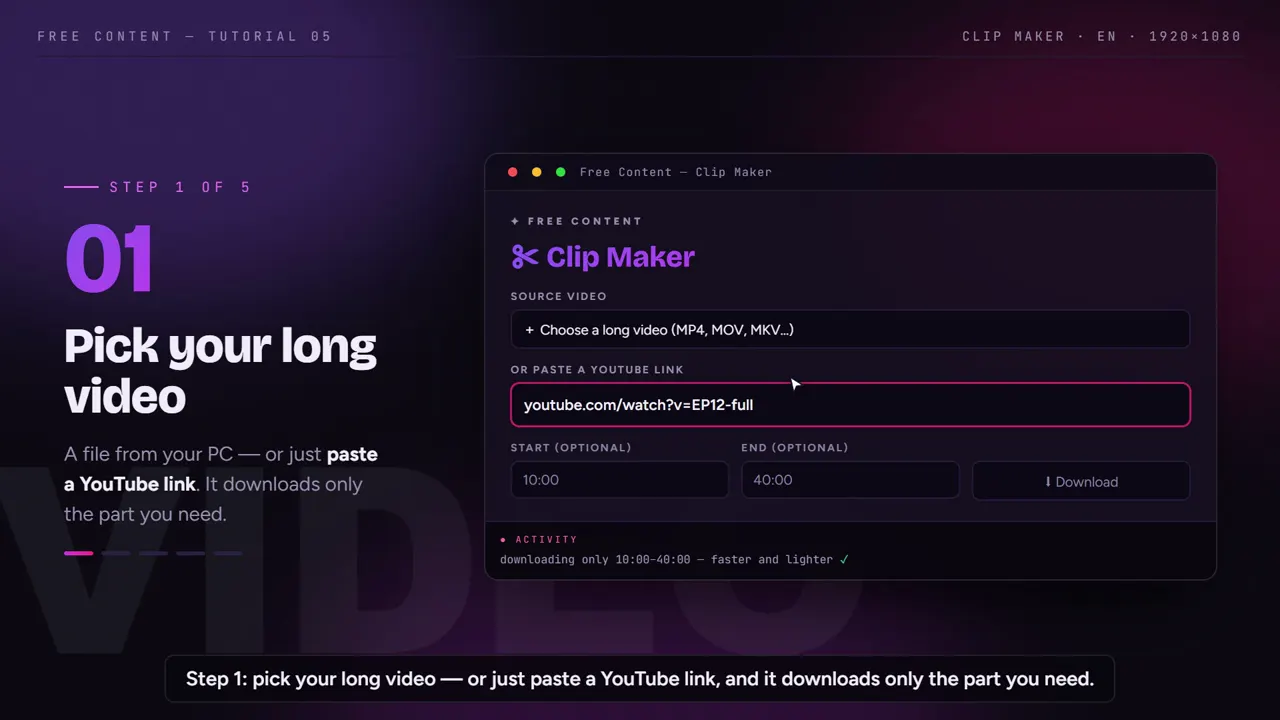
A file on your PC or a YouTube link. With a link, you mark the section and the app downloads only that part. Only use material you have the right or permission to clip.
The AI clips
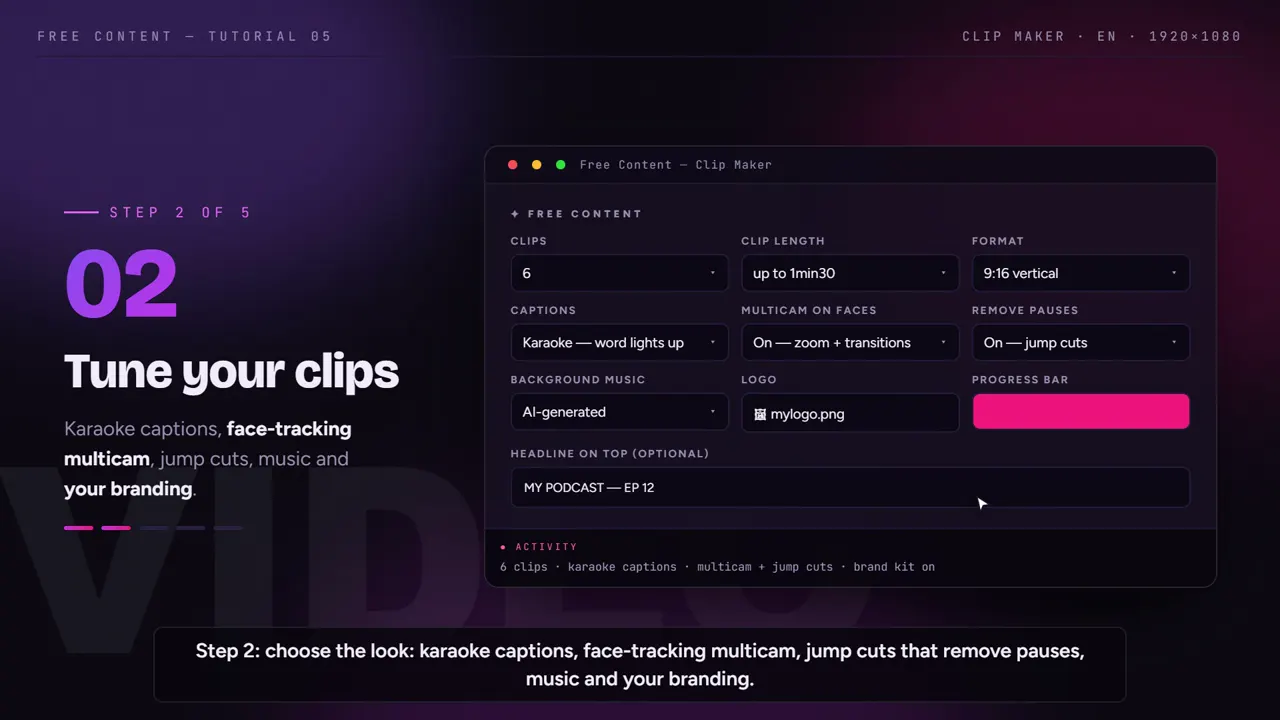
It transcribes everything, picks the strongest moments, closes each clip on a complete sentence, follows the speaker's face and adds karaoke captions.
Schedule the week
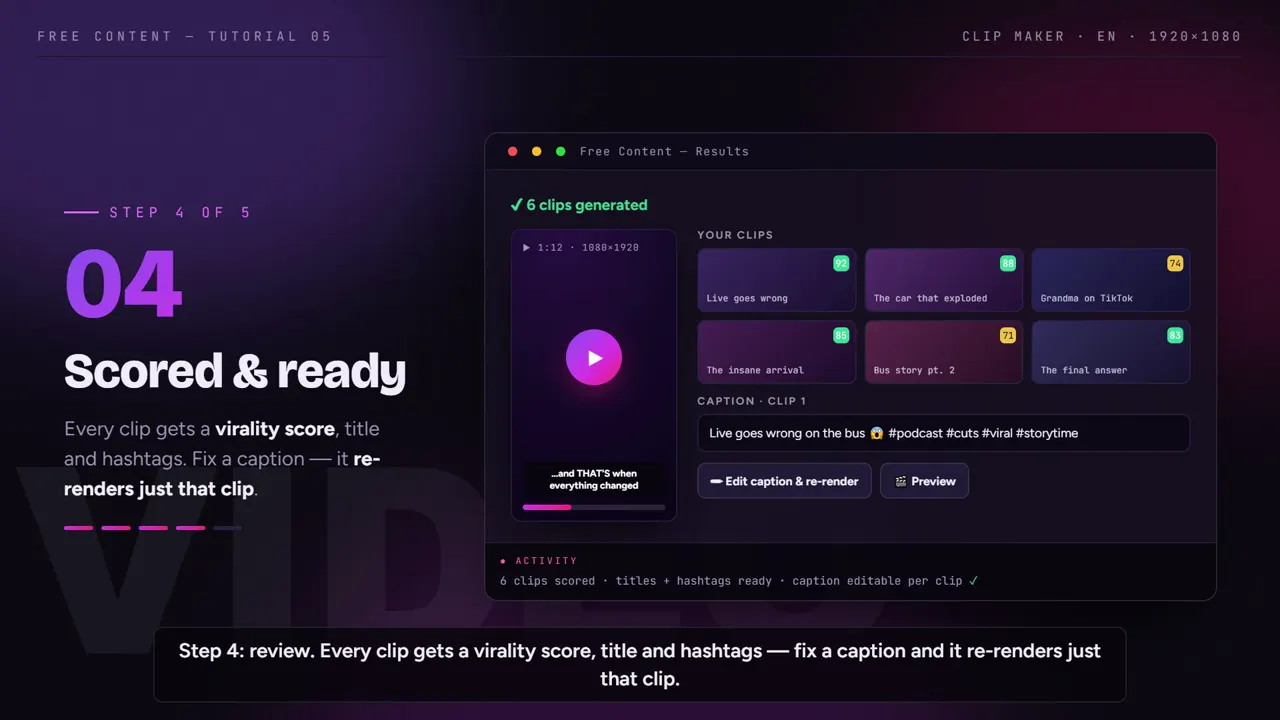
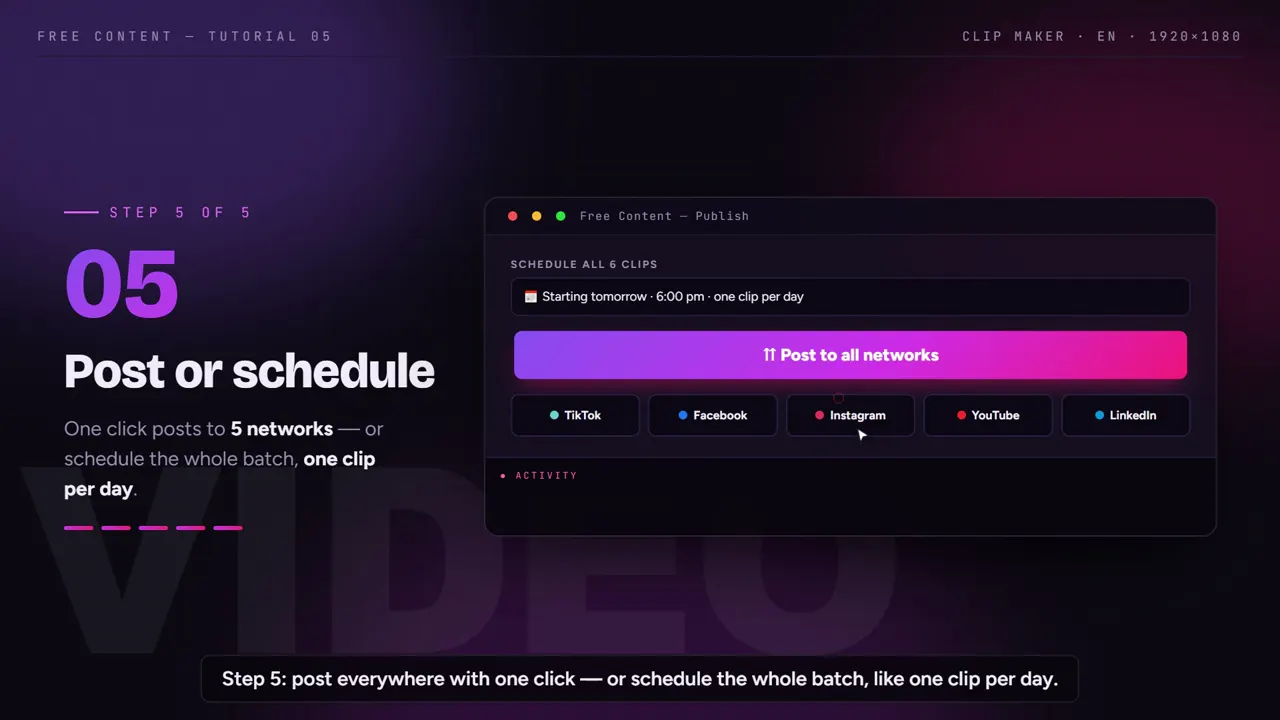
Each clip comes with a title, hashtags and a virality score. Sort by score and schedule the batch: one clip a day, on the networks you choose.
A batch of clips, start to finish.
A tutorial recorded inside the app: a long video becomes clips with captions, the face in frame and a virality score to decide the order.
What it looks like inside the app.
Screens from the tutorial recorded in the app.
What is a clip channel?
A clip channel publishes short excerpts from longer videos — podcasts, interviews, livestreams, talks — as Shorts, Reels and TikToks. The creator records the long version; the clip channel finds the moments that work on their own and takes them to people who would never watch two hours.
The work is editorial, not just technical: picking the moment, framing it vertically, captioning it, writing a title and posting every day. That's why the routine weighs so much — and why most of it can be automated.
It only works with permission: a clip channel clips its own content or content whose owner allows clipping. More on that below.
Types of clip channels.
The niche defines the source material. The workflow in the app is the same for all of them.
Podcast clips
- Long conversations, lots of material
- Many shows publish their own clipping rules
- See podcast clips
Interviews and talk shows
- Direct answers make strong clips
- The camera follows whoever is speaking
- Works when the source switches cameras
Streams and sports talk
- Recorded livestreams and commentary
- Selection follows what is said, so commentary matters
- Respect each league's or streamer's rights
Sermons and services
- The week's message in short videos
- Usually run by the church itself
- See church sermon clips
What weighs on a clip channel — and who does it now.
If you clip every day, you know where the time goes. There are four stages, and none of them needs a timeline.
Finding the moment that holds
- The full audio is transcribed before choosing
- The AI picks the strongest moments, not equal slices
- You say how many clips you want and how long each one is
Vertical, face and pacing
- Outputs 1080×1920, square or horizontal
- In vertical, the speaker stays in frame
- Pauses and hesitations are cut out of each clip
Your channel's look
- Your logo and a progress bar
- A written hook at the top of the clip
- AI-generated music under the speech
From file to feed
- Title and hashtags ready on every clip
- TikTok, Facebook, Instagram, YouTube, LinkedIn, X, Threads, Bluesky, Pinterest and Bilibili
- A scheduled list to track and cancel
Clipping by hand vs clipping in Free Content.
Same task, two ways to do it. The right-hand column is what the app delivers on its own.
| By hand | In Free Content | |
|---|---|---|
| Finding the moment | watch the whole video | full transcript and AI selection |
| Clip start and end | manual trimming on the timeline | always on a complete sentence |
| Vertical framing | keyframe by keyframe | camera that follows the face |
| Captions | type or sync them | word-by-word karaoke |
| A word is wrong | open the project and export again | fix it and redo only that clip |
| Title and hashtags | write them one by one | ready, with a virality score |
| Posting | open each network and upload again | one click or batch scheduling |
Where hand editing still wins: handcrafted clips, with effects chosen frame by frame. Where the app wins: volume. If you need a clip a day, every day, you spend your time reviewing, not assembling.
Copyright: only clip what you're allowed to clip.
Clip channels often work with other people's content. That's why the rule comes before any tool: only clip what you have the right or permission to use. That applies to podcasts, livestreams, interviews and TV shows.
There are three safe paths: clip your own content, clip creators who have authorized you in writing, or use material licensed for reuse. Many creators run clipping programs with their own rules — read the rules and keep the authorization.
Free Content doesn't check the rights of any video. It downloads and clips whatever you point it to. Responsibility for what goes live lies with whoever publishes it, and networks can take down a video or a channel over a copyright claim.
How a clip channel makes money.
There are two common paths, and both depend on the rules of each platform and each creator. The first is the platforms' own monetization: YouTube and other networks run partner programs with their own eligibility requirements, and how they treat clips of someone else's content depends on their policies.
The second is clipping programs authorized by the creator: some podcasters and streamers invite clippers and publish their own rules and rewards. Read the rules of each program before you start.
We don't promise any amount — results depend on the niche, consistency and each program's rules. What the app changes is the production cost: one plan with no credits and no minute quota, so clipping more doesn't cost more.
Volume without rationing minutes.
Browser tools usually charge per minute processed. On a clip channel that gets tight fast: one two-hour podcast a day already eats the month's quota. Here, clipping and rendering are local. There's no raw file upload, no queue and no monthly limit. The time for each batch depends only on your computer.
The AI that picks the moments and writes the titles uses your own free keys from Google Gemini or NVIDIA NIM. There's no per-token cost. If you prefer, you can use a paid key.
There's a single plan — no credits, no minute quota, scheduling included — at R$ 47/month (Brazilian reais), cancel anytime. To understand each step in detail, see how to turn a long video into short clips, how to go from YouTube to Shorts, how the auto captions work and how the app can convert horizontal video to vertical.
Frequently asked questions.
If your question is about the app in general, the home FAQ covers the rest.
How many clips can I get from one video?
Does the AI pick the moments or just split the video into equal parts?
Can I clip videos from another channel?
In what order should I post the clips?
Do I have to pay for the AI that picks the moments?
Can I run more than one clip channel in the same app?
Do the clips carry my channel's branding?
How do I get permission to clip a podcast?
Do I need my own podcast to run a clip channel?
How long should I wait before posting a clip?
Does it work with audio-only podcasts?
Does it run on a phone or in the browser?
Test it with the next video you'd clip.
Download it, point it at a video you have the right to clip and watch the batch come out ready to schedule. Seven days, full app, no credit card.
⤓ Download Free Content for WindowsWho it's for
- Clip channel
- Podcast clips
- Church sermon clips
- For agencies