Best Opus Clip alternatives in 2026.
Four Opus Clip alternatives compared side by side — Free Content, Wisecut, Vizard and CapCut — with what each one does best and where each one falls short. Disclosure: Free Content is our product. That's exactly why we also show where the others beat us.
How to choose an Opus Clip alternative in 3 questions.
Every tool on this list takes a video and gives you short-form video back. What changes is where it runs, what the free plan unlocks and what it costs to publish. Those three questions shaped this comparison.
Browser or PC?
Wisecut, Vizard and Opus Clip itself run in the browser, on any machine. CapCut has mobile, desktop and web. Free Content is a Windows program (Mac in beta) that processes on your computer: no upload, no queue, no quota.
What does free unlock?
Compare watermark, resolution, minutes per month and how many days your video is kept. That's where free plans differ the most.
What does publishing cost?
Publishing and scheduling to social networks usually sits on paid plans. Check which plan includes it, which networks and how many accounts.
The Clip Maker in a minute and a half.
A tutorial recorded inside the app: a long video becomes clips with captions, face-tracking camera and a virality score, ready to schedule.
What it looks like inside the app.
Screens from the tutorial recorded in the app.
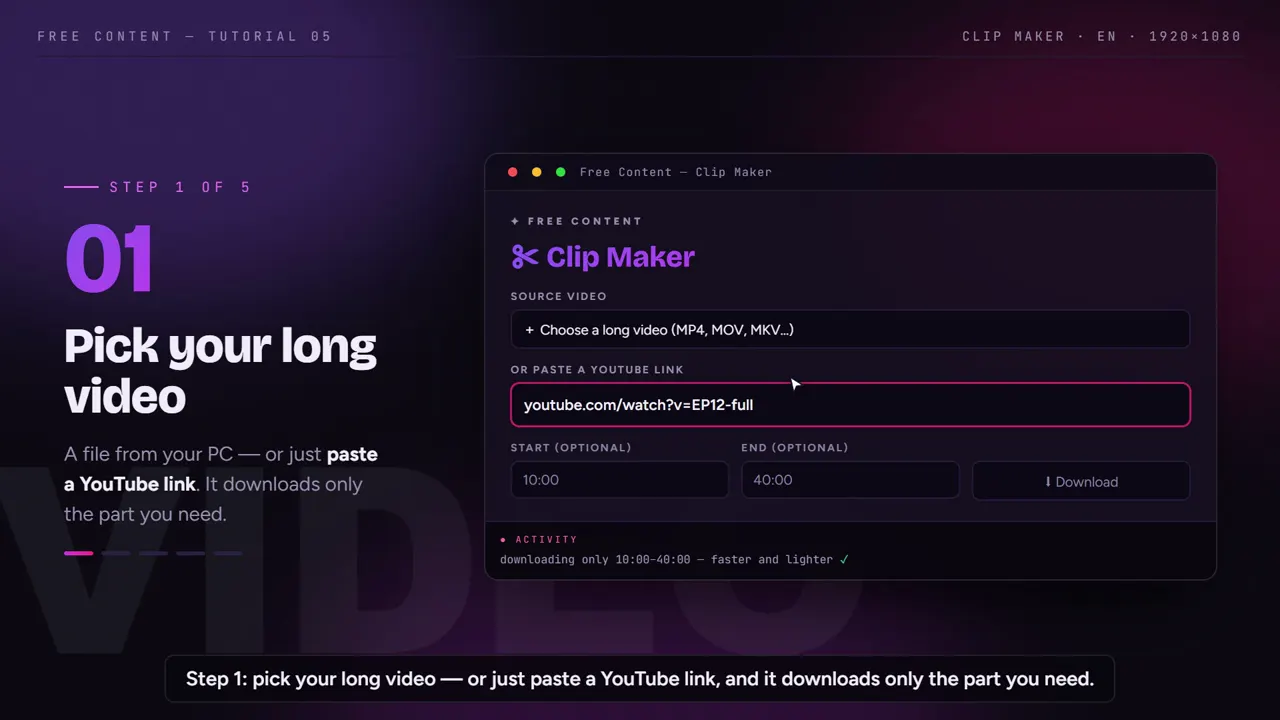
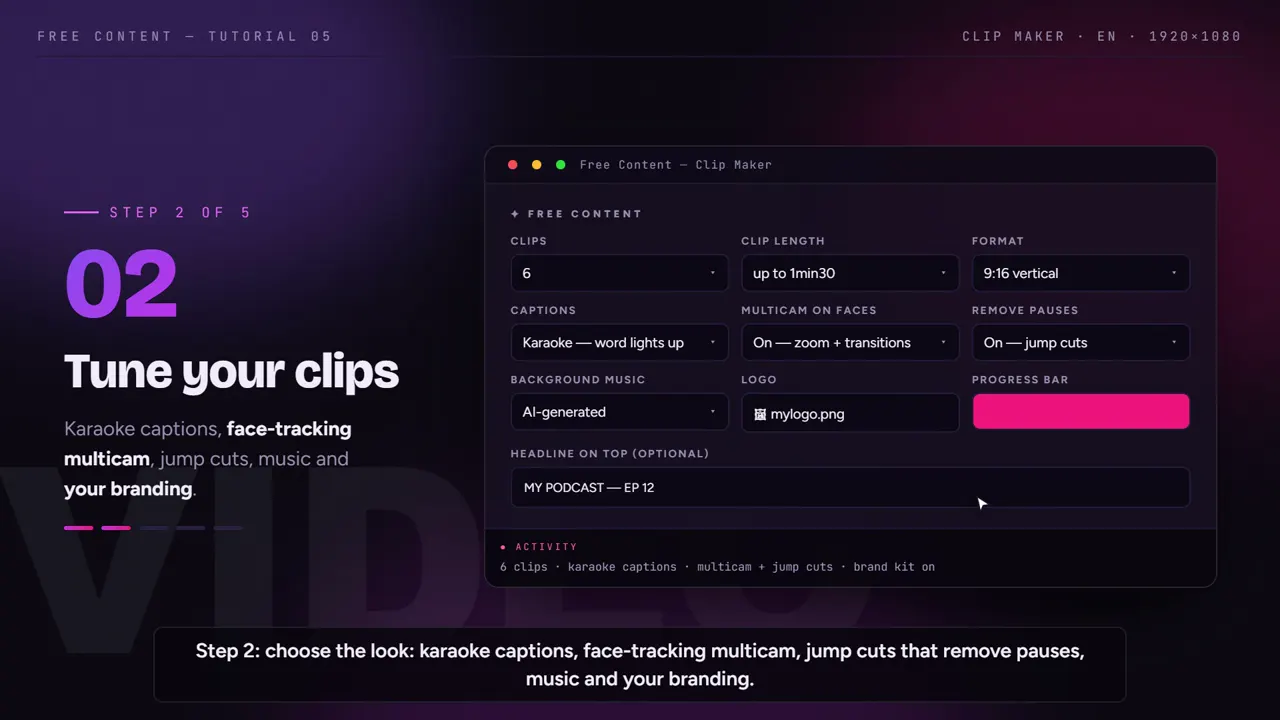
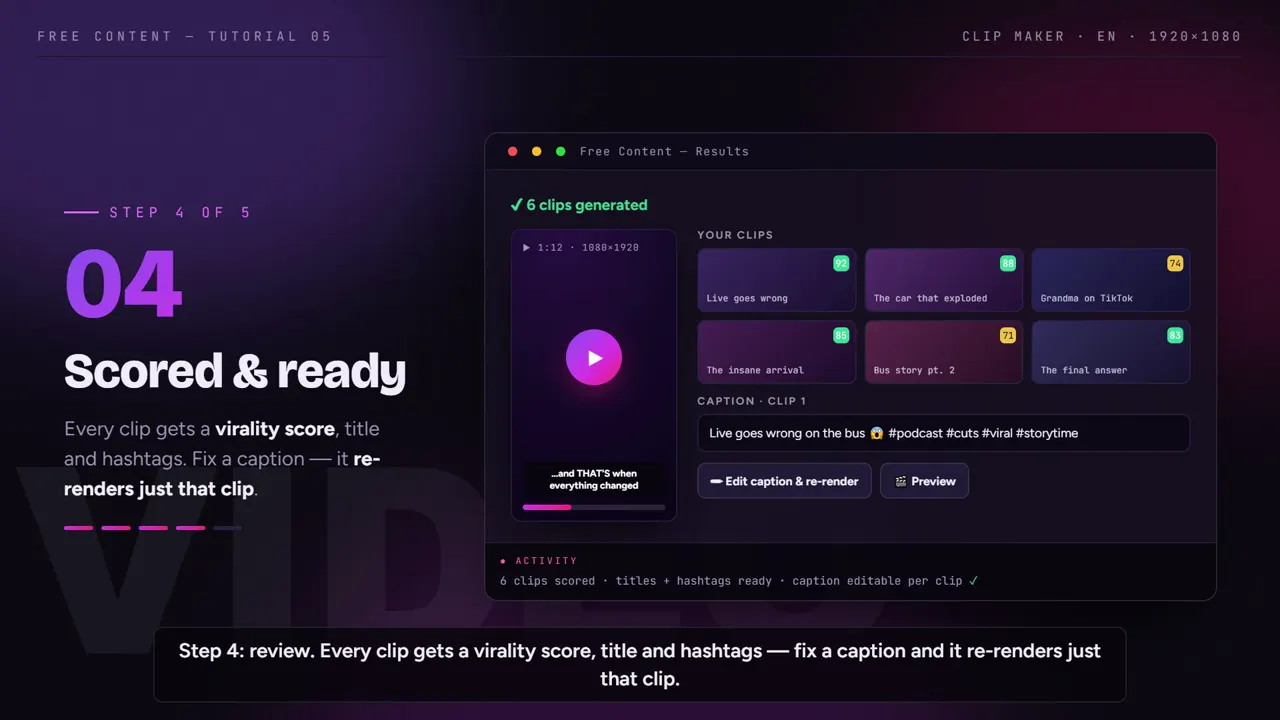
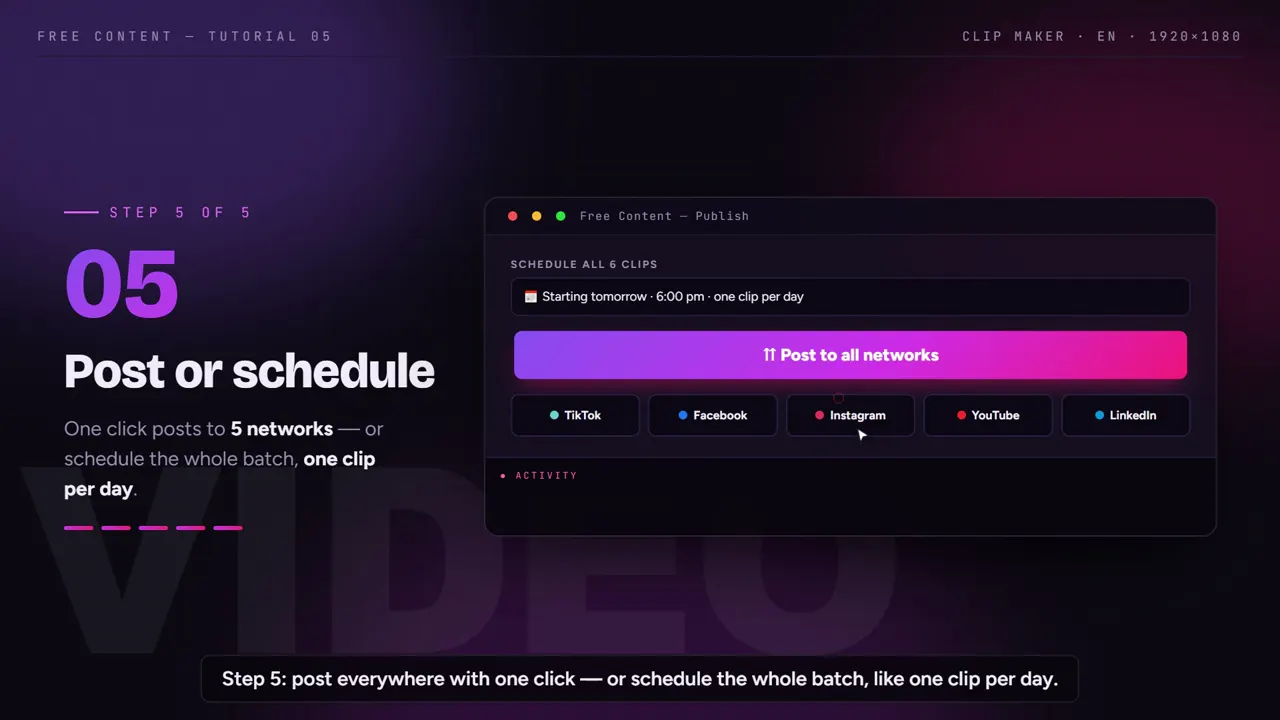
The 4 best Opus Clip alternatives, one by one.
Each tool with what it does best and the limit that matters. Competitor data taken from the official pricing pages on October 24, 2026.
Free Content — best for clipping every week on a PC
- Strength: one plan, R$ 47/month (Brazilian reais), no credits and no minute quota — rendering is local
- Strength: never adds a watermark; publishes and schedules to 10 networks, including X, Threads, Bluesky, Pinterest and Bilibili, even on the trial
- Strength: face-tracking camera, word-by-word karaoke captions and a virality score on every clip
- Limit: Windows 10/11 only (Mac in beta) — doesn't run in a browser, on a Chromebook or on a phone
- Limit: exports in Full HD, not 4K, and processing time depends on your PC
Wisecut — best for working in the browser with a 4K option
- Strength: runs in the browser, on any computer, without using your processor
- Strength: no watermark, and 4K on Professional+ (US$ 118/month, up to 3 accounts per network)
- Strength: schedules and publishes on paid plans
- Limit: small free plan — 30 min/month, exports up to 3 min at 480p
- Limit: monthly hours are counted (Starter+ at US$ 33: 5 h of editor + 2.5 h of Autopilot)
Vizard — best for trying free in the browser and managing several accounts
- Strength: free plan with 60 credits/month (1 credit = 1 minute of video), nothing to install
- Strength: 4K and no watermark on paid plans
- Strength: scheduling with 6 or 20 social accounts on paid plans
- Limit: on free, a watermark, 720p, exports up to 10 min and videos kept only 3 days
- Limit: everything is counted in credits (from 600/month on paid plans)
CapCut — best if you like editing by hand
- Strength: a full editor with timeline, templates and effects
- Strength: mobile app, desktop and browser
- Strength: has a tool to turn long videos into shorts
- Limit: you do the editing — it's a manual editor with AI tools, not an automatic queue that publishes
- Limit: Pro features may leave a watermark on the free plan; Pro pricing varies by country
Opus Clip and its alternatives: the side-by-side table.
Opus Clip sits in the last column as a reference. Where we couldn't check a figure reliably, the cell says so instead of guessing.
| Free Content | Wisecut | Vizard | CapCut | Opus Clip (reference) | |
|---|---|---|---|---|---|
| Where it runs | desktop app — Windows 10/11, Mac in beta | browser | browser | mobile, desktop and browser | browser (clip.opus.pro) |
| Free plan | 7-day trial with the full app, no card | 30 min/month, exports up to 3 min at 480p | 60 credits/month, exports up to 10 min at 720p, videos kept 3 days | yes; Pro features may leave a watermark | US$ 0, up to 1080p, videos kept 3 days, no publishing |
| Entry paid plan | R$ 47/month (Brazilian reais), single plan | US$ 33/month (Starter+) | Creator — price not checked | Pro — price varies by country and platform | US$ 15/month (Starter); Pro at US$ 29/month |
| Minute or credit limits | none — rendering is local | 5 h of editor + 2.5 h of Autopilot on Starter+ | 1 credit = 1 min; paid plans from 600 credits/month | not checked | the pricing page doesn't show the quota |
| Max resolution | Full HD (1080×1920 vertical) | 4K on Professional+ (US$ 118/month) | 4K on paid plans | not checked | 1080p on free; paid plans not checked |
| Watermark | never, not even on the trial | none | yes on free; no on paid plans | Pro features may leave one on free | animated captions watermarked on free; none from Starter |
| Publishing | publishes and schedules to 10 networks, even on the trial | schedules and publishes on paid plans | schedules on paid plans (6 or 20 accounts) | manual editor, not an automatic posting queue | Starter publishes to 3 networks without a scheduler; Pro schedules to 9 |
Checked in October 2026 on the official pricing pages — plans and prices change, so check their website before you decide. Vizard and CapCut prices are left out because we couldn't verify them reliably. Where the others beat us: a browser on any computer (Wisecut, Vizard, Opus Clip), 4K (paid Wisecut and Vizard) and a phone app with a full manual editor (CapCut).
Which Opus Clip alternative should you pick?
If you clip a lot — a podcast, livestream or sermon every week — and you work on a Windows PC, Free Content tends to work out cheaper: one plan, no credits, no minute quota, and scheduling to 10 networks included. If you need to deliver in 4K, Wisecut and Vizard do that on paid plans and we don't. If you edit on your phone or want full control over every cut, CapCut is the right tool.
And to be fair: if you want to stay in the browser, Opus Clip itself on the Pro plan schedules to 9 networks. Switching only makes sense if what bothers you is the quota, the watermark on free, or the price of scheduling.
Who usually gains from a tool that runs on the PC: clip channels, creators making podcast clips from video recordings, and agencies with several client accounts. See how Free Content turns long videos into short clips.
Compare them one by one too: Opus Clip vs Free Content · Wisecut vs Free Content · Vizard vs Free Content · CapCut vs Free Content · CapCut alternatives for automatic clips.
Frequently asked questions.
If your question is about the app in general, the home FAQ covers the rest.
Which Opus Clip alternative is free?
Which one doesn't add a watermark?
Which one runs on a Windows PC?
Which one publishes to social media by itself?
Does it work with an audio-only podcast?
Which one exports in 4K?
Why isn't Free Content the best choice for everyone?
Where does the competitor data come from?
Try the alternative that runs on your PC.
7 days with the full app, no sign-up and no card. Clip the same episode in Free Content and in the tool you use today, and compare the moments picked, the captions and the time until the post is scheduled.
⤓ Download Free Content for Windows