An Opus Clip alternative with one flat plan.
Opus Clip is one of the best-known tools for pulling clips out of long videos, and it works well in the browser. This Opus Clip alternative does the same job on your own computer, on one plan with no credits or minute quota (R$ 47/month, Brazilian reais), and schedules to 10 networks from day one of the free 7-day trial.
Three differences you feel every day.
Both take a long video and hand back short clips picked by AI. What changes is how you pay, where the file lives and what each plan unlocks.
One plan, everything in
Opus Clip splits features across paid tiers. Here there's one plan — no credits, no minute quota, scheduling included — with nothing held back for a pricier tier.
Your clips stay with you
On Opus Clip's free plan, videos disappear after 3 days. In Free Content the clip is saved on your PC and stays there until you delete it.
Scheduling without upgrading
Publishing and scheduling are not a premium-tier feature. The 7-day trial already posts and schedules to TikTok, Facebook, Instagram, YouTube, LinkedIn, X, Threads, Bluesky, Pinterest and Bilibili.
The Clip Maker in a minute and a half.
A tutorial recorded inside the app: a long video becomes clips with captions, face-tracking camera and a virality score, ready to schedule.
What it looks like inside the app.
Screens from the tutorial recorded in the app.
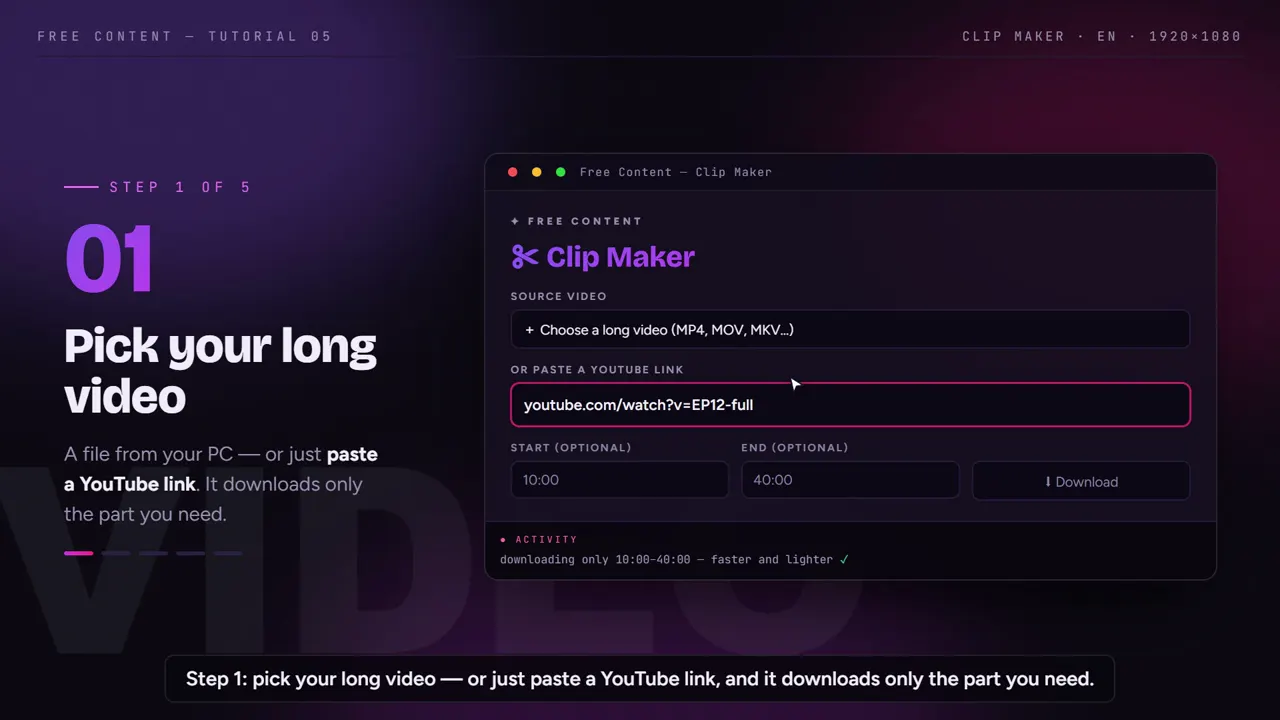
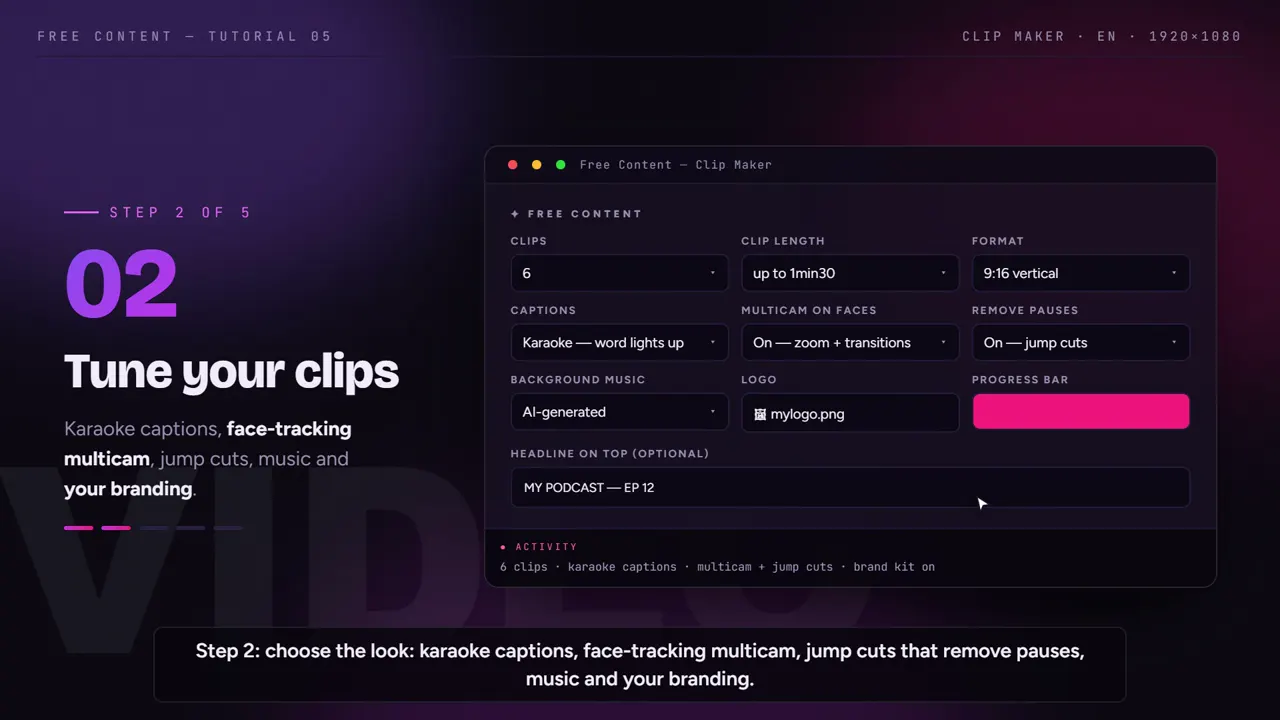
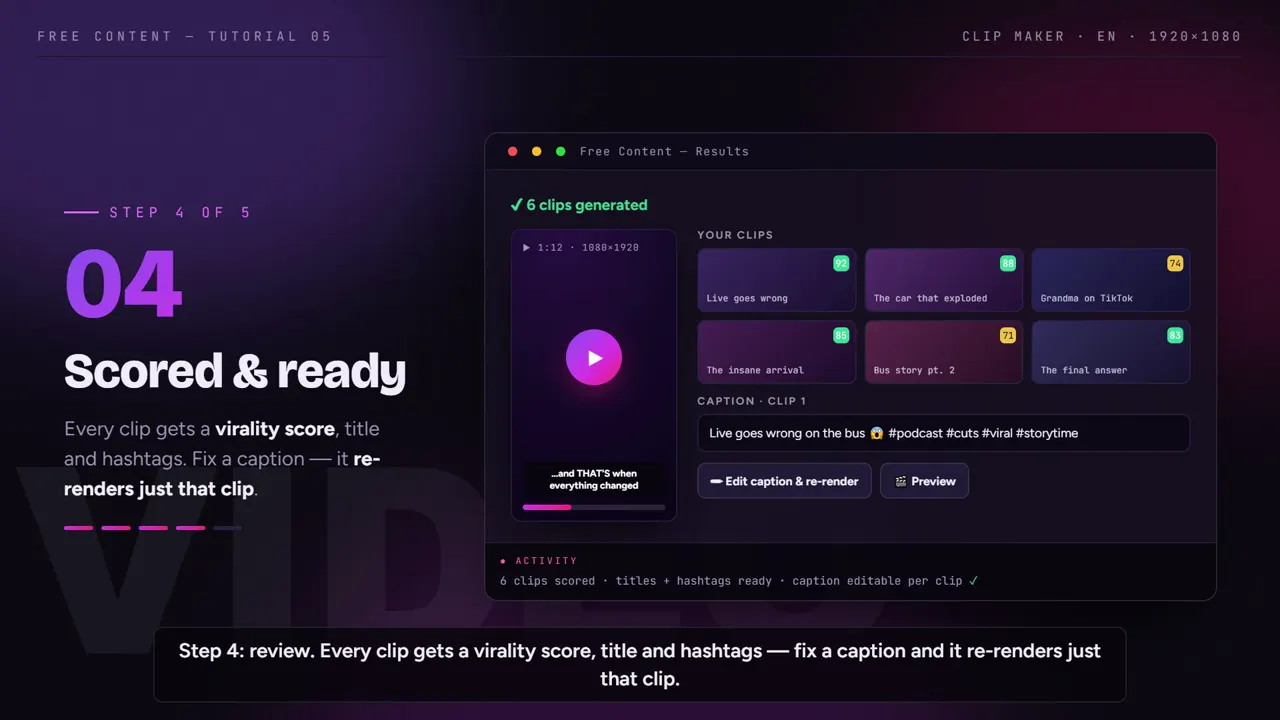
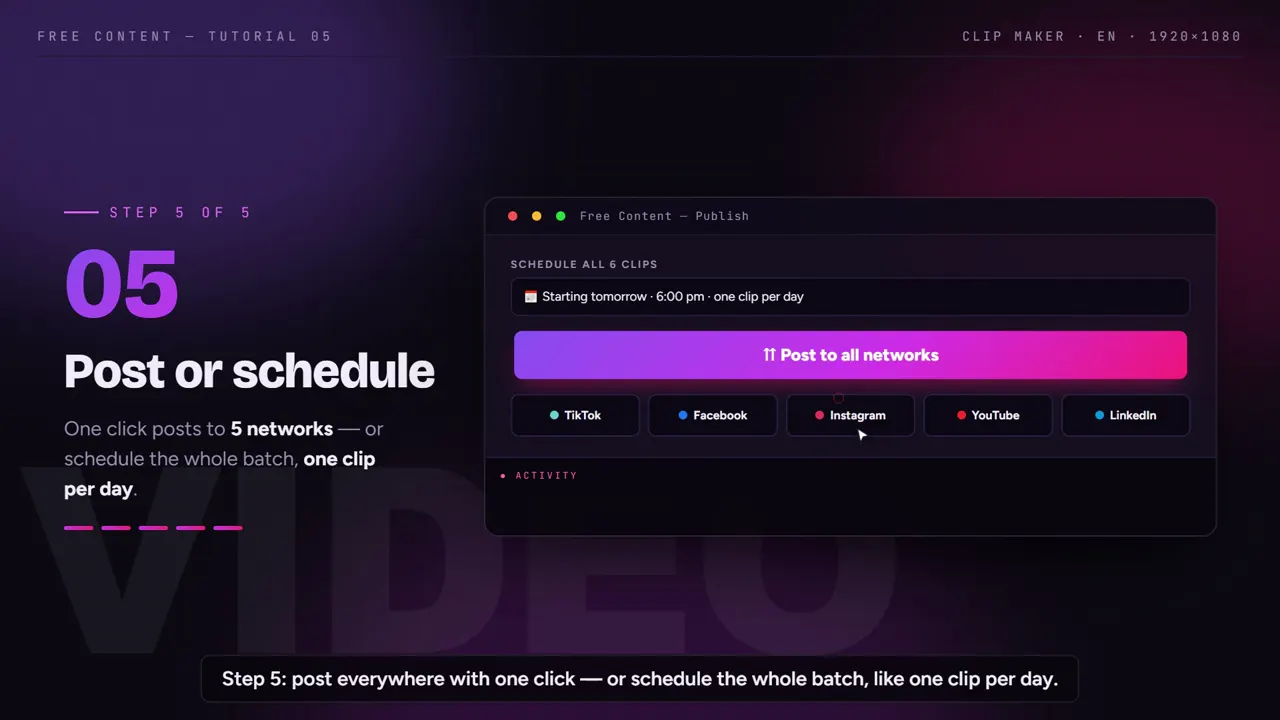
Opus Clip vs Free Content, plan by plan.
Opus Clip data taken from its official pricing page on October 24, 2026. The page does not show the credit allowance for each plan, so that is left out. Prices change; check their site before you decide.
| Opus Clip | Free Content | |
|---|---|---|
| Where it runs | in the browser (clip.opus.pro) | desktop app on your PC — Windows 10/11, Mac in beta |
| Free plan | US$ 0, animated captions with a watermark, videos kept for 3 days | 7 days with the full app, no watermark |
| Entry plan | US$ 15/month: no watermark, publishes to YouTube Shorts, TikTok and Instagram, no scheduler | one plan, everything unlocked — R$ 47/month (Brazilian reais) |
| Scheduling | from the Pro plan, US$ 29/month | included, even on the trial |
| Networks | on Pro: YouTube Shorts, TikTok, Instagram, Facebook, LinkedIn, X, Pinterest, Threads and Bluesky | 10, even on the trial: YouTube, TikTok, Instagram, Facebook, LinkedIn, X, Pinterest, Threads, Bluesky and Bilibili |
| Where videos are stored | in the service's cloud | on your computer |
| Resolution | up to 1080p, even on free | Full HD (1080×1920 vertical) |
| Billing | by tier | one plan, no credits or minute quota, cancel anytime |
| Make a video without footage | not the focus | 8 formats from a single topic |
Where Opus Clip wins: it runs on any computer with a browser and needs no processing on your own machine. Where Free Content wins: one flat plan with scheduling included on 10 networks (Opus Clip Pro has 9), and no file uploading to or expiring from a cloud.
Why use Free Content as an Opus Clip alternative.
If you come from Opus Clip, you are used to sending a video and getting ranked clips back. Free Content works much the same way, with a few differences in the details.
File on your PC or a link
- Podcast, livestream, class, sermon or gameplay already recorded
- With a YouTube link, it downloads only the part you mark
- Nothing is uploaded to a server before cutting
A virality score per clip
- The AI reads the whole transcript before choosing
- Each clip comes with a title, hashtags and a score
- The score helps you decide the posting order
Captions, face tracking and branding
- Word-by-word karaoke captions
- In vertical, the camera follows whoever is speaking
- Logo, progress bar and a hook at the top
The whole batch, scheduled
- One clip a day, for example
- A list of scheduled posts to keep track of
- Cancel one post without touching the others
When switching makes sense — and when it doesn't.
Stay with Opus Clip if you work on a computer that can't handle video processing, or if you like doing everything in the browser.
Switching makes sense if paying more for each tier adds up at the end of the month, if you want to schedule the whole week without upgrading, or if you've lost clips because the video expired in the cloud before you downloaded it. It also makes sense if, besides turning a long video into short clips, you want to create cards, narrated videos with clips from the internet or product ads in the same app.
One honest point: processing time depends on your computer. On a modest PC, a long video takes longer. In exchange, there is no server queue and no monthly export quota.
The 7-day trial asks for no sign-up and no credit card. Cut the same episode in both and compare the choice of moments, the auto captions and the time until the post is scheduled.
Who it's for — and what else to compare.
People who switch from Opus Clip usually clip every week: a clip channel, a show turning episodes into podcast clips, a church posting sermon clips, or an agency producing for several clients — see video automation for agencies.
Compare also: Wisecut alternative, Vizard alternative, CapCut alternative, plus the best Opus Clip alternatives and the CapCut alternatives for clips.
Frequently asked questions.
If your question is about the app in general, the home FAQ covers the rest.
Why use Free Content as an Opus Clip alternative?
Will I pay per tier like on Opus Clip?
Do the clips disappear after a few days?
Does Opus Clip publish to more networks?
Do captions get a watermark during the trial?
Does the AI pick the best moments on its own?
Do I have to pay for the AI separately?
Does my computer need to be powerful?
What kinds of video work?
Which languages does it support?
Is there a limit on video length?
Does it work with audio-only podcasts?
Cut the same episode in both and compare.
Download it, point it at the video you'd send to Opus Clip and watch the clips come out with a score, captions and a schedule — on one flat plan after the trial.
⤓ Download Free Content for Windows