A Vizard alternative with no per-minute credits.
On Vizard AI, every minute of video you upload spends a credit. This Vizard alternative cuts on your own computer, so there are no credits to count — and it keeps each client's accounts in a separate profile, on one plan with scheduling included (R$ 47/month, Brazilian reais).
Where credits stop existing.
Vizard is a good browser-based video clipper. The billing model is what changes everything: there, the math is done in minutes of video; here, there is no math at all.
Minutes don't become credits
A 90-minute podcast spends 90 credits on Vizard. In Free Content it only spends your PC's processing time.
No upload cap
There is no upload. The multi-gigabyte file is already on your drive and is read from there, with no size limit per upload.
One profile per client
Each client's social accounts are stored in a profile. Switch at the top of the app and schedule their batch.
The Clip Maker in a minute and a half.
A tutorial recorded inside the app: a long video becomes a batch of clips with captions, face-tracking camera and a virality score.
What it looks like inside the app.
Screens from the tutorial recorded in the app.
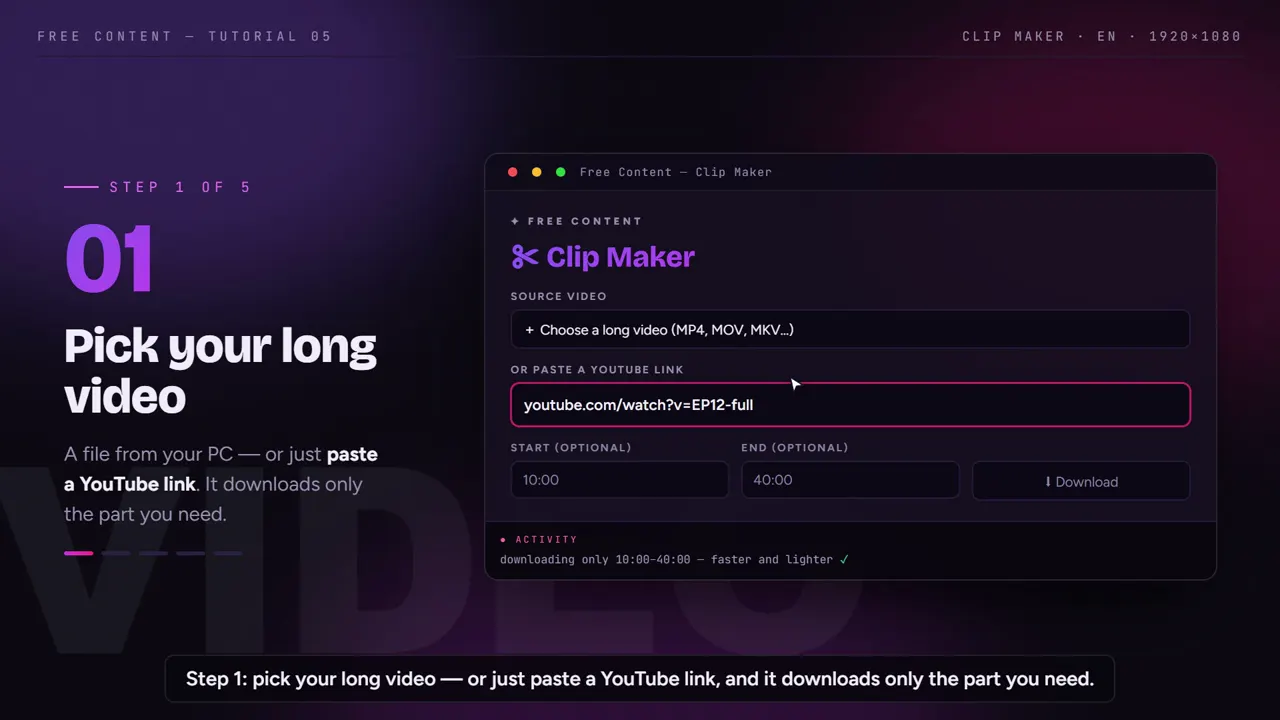
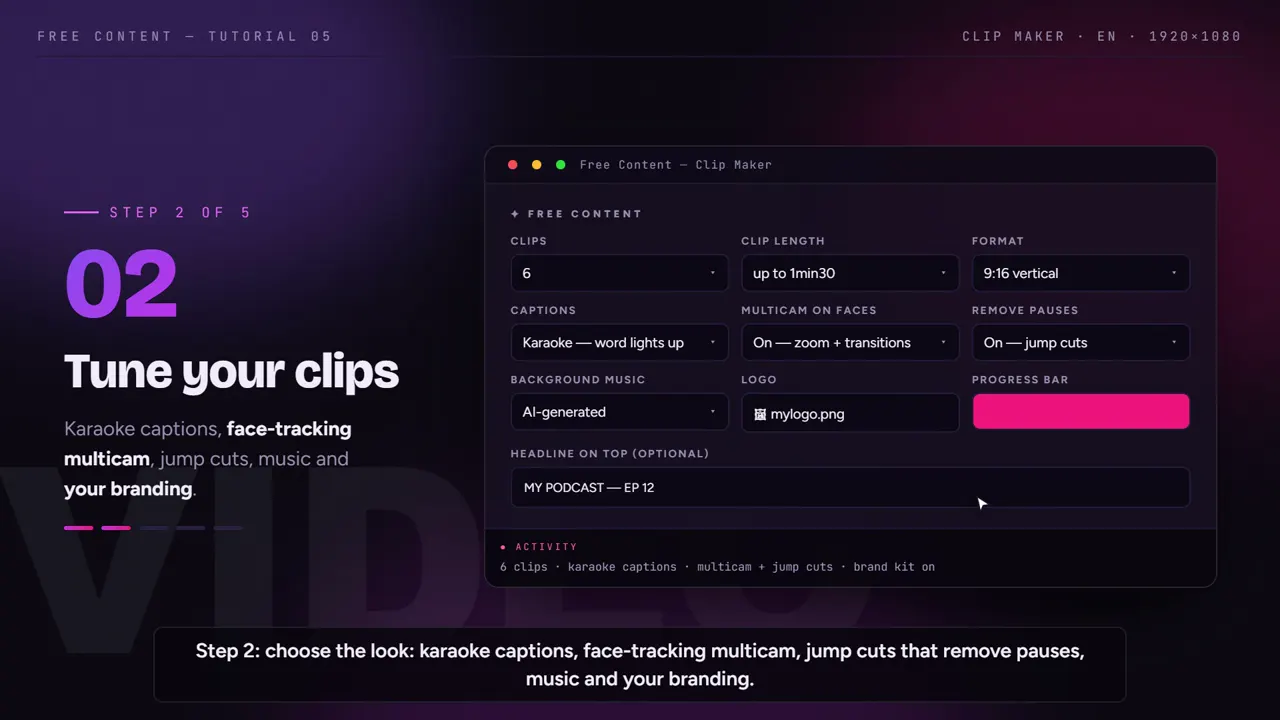
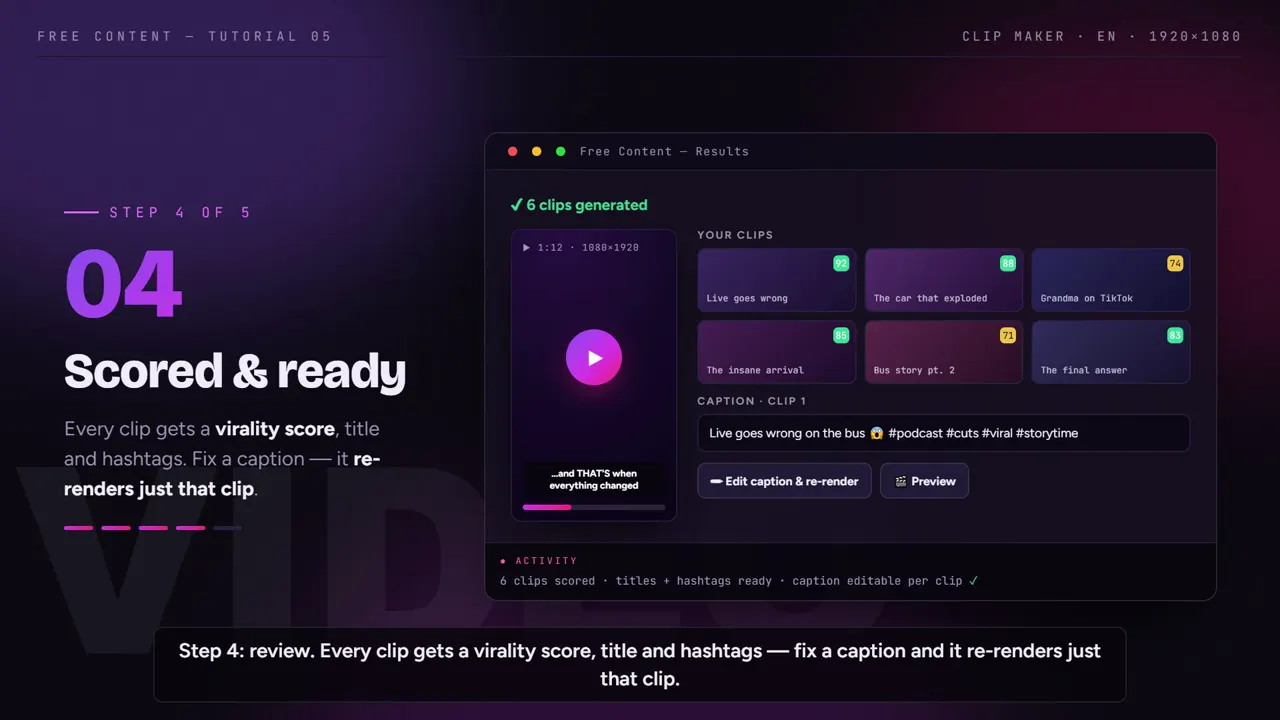
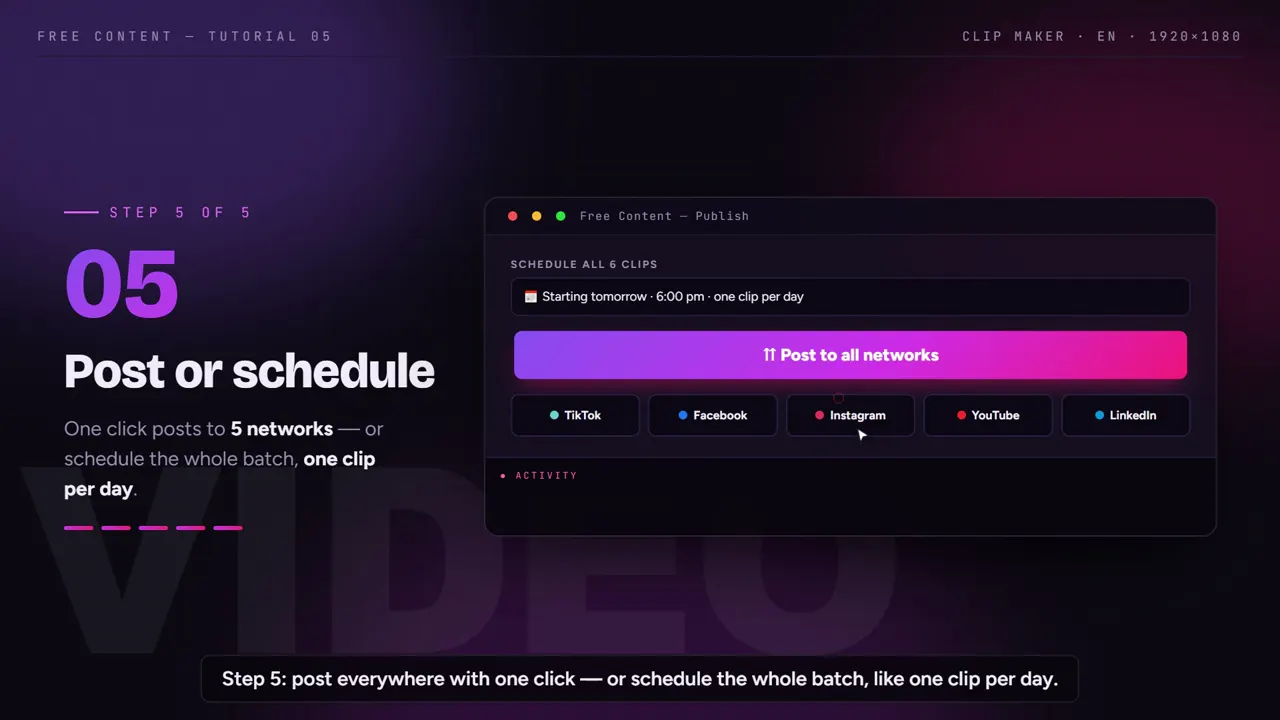
Vizard vs Free Content, side by side.
Vizard data taken from its official pricing page on October 24, 2026. The exact price of the paid plans wasn't legible on the page, so it's left out. Check their site before you decide.
| Vizard | Free Content | |
|---|---|---|
| Where it runs | in the browser | desktop app on your PC — Windows 10/11, Mac in beta |
| How it charges | credits: 1 credit = 1 minute of video | R$ 47/month (Brazilian reais), single plan, no credits |
| Free plan | 60 credits/month, 720p exports up to 10 min, with watermark | 7 days with the full app, no watermark |
| Paid plans | Creator and Business: from 600 credits/month, uploads up to 600 min or 30 GB | one plan, no minute quota |
| Max resolution | 4K on paid plans | Full HD (1080×1920 vertical) |
| Aspect ratios | check their site | vertical 1080×1920, square 1080×1080, horizontal 1920×1080 — Full HD |
| How long videos are kept | 3 days on the free plan | on your drive, until you delete them |
| Social accounts | 1 on free; scheduling with 6 or 20 accounts on paid plans | several accounts per client, in separate profiles |
| Networks | scheduling on paid plans | 10 networks — TikTok, Facebook, Instagram, YouTube, LinkedIn, X, Threads, Bluesky, Pinterest and Bilibili — even on the trial |
| Make a video without footage | not the focus | 8 formats from a single topic |
Where Vizard wins: it exports in 4K, runs on any machine with a browser and doesn't use your processor. Where Free Content wins: there are no credits — long, frequent material doesn't burn through the quota mid-month, and the file doesn't have to fit an upload limit.
Built for people who clip for several clients.
Agencies and freelance editors are the ones who feel credits run out the most. That's why Free Content was designed to produce at volume and keep each client's work separate.
Separate profiles
- Each client's accounts in their own profile
- Switch clients at the top of the app
- One client's schedule never mixes with another's
A whole batch at once
- Several clips from the same long video
- Clip length you define
- Warns you when the video is too short for the number requested
Corrections without redoing everything
- A caption word is wrong? Fix it
- The app redoes only that clip
- The other clips in the batch stay ready
Video in any common language
- Transcription with automatic language detection
- Captions can be translated
- Title and hashtags in the caption language
When switching makes sense — and when it doesn't.
Stay with Vizard AI if you have to deliver in 4K, if you work across many different computers or on a weak laptop, or if you clip little and your monthly credits have room to spare.
Switching makes sense if you're always calculating how many minutes are left, if clients send livestreams and podcasts over an hour long every week, or if you need to keep each client's accounts organized without mixing schedules. The video automation for agencies page shows that workflow in detail.
It also makes sense if you run a clip channel: the volume is high, episodes are long and every credit saved would matter. With no credits, the cost is the same whether you cut one episode or thirty.
The 7-day trial is complete and needs no credit card. Take the longest video you'd cut in Vizard and run it in Free Content to see the result without spending a single credit.
Who it's for — and what else to compare.
It was built for volume: agencies (see video automation for agencies), a clip channel, shows turning episodes into podcast clips and churches posting church sermon clips.
Compare also: Opus Clip alternative, Wisecut alternative, CapCut alternative, plus the best Opus Clip alternatives and the CapCut alternatives for clips.
Frequently asked questions.
If your question is about the app in general, the home FAQ covers the rest.
How much does a credit cost in Free Content?
Can I keep each client's accounts separate?
Does Free Content export in 4K like Vizard?
Do videos over an hour long work?
Can I clip videos spoken in other languages?
If I fix one caption word, does the app redo every clip?
Where are my videos and API keys stored?
Do the clips come out with a watermark?
Does it work for TikTok, Reels and Shorts?
Does it run in the browser like Vizard AI?
What files does it accept?
Run your longest video without spending credits.
Download it, point it at the episode that would eat your Vizard credits and watch the batch of clips come out ready to schedule.
⤓ Download Free Content for Windows